
Quickly Convert JSON to C# Classes in Visual Studio
Steps
Step 1: Prepare JSON Data
Copy the JSON content you want to convert, for example:
json
{
  "User": {
    "Id": "Wing",
    "Name": "小翼",
    "Dept": {
      "Id": "SAO",
      "Name": "艾恩葛朗特"
    }
  }
}Step 2: Locate the Code
In the Visual Studio editor, move your cursor to the location where you want to generate the class code.
Step 3: Perform Conversion
Click on: Edit → Paste Special → Paste JSON As Classes
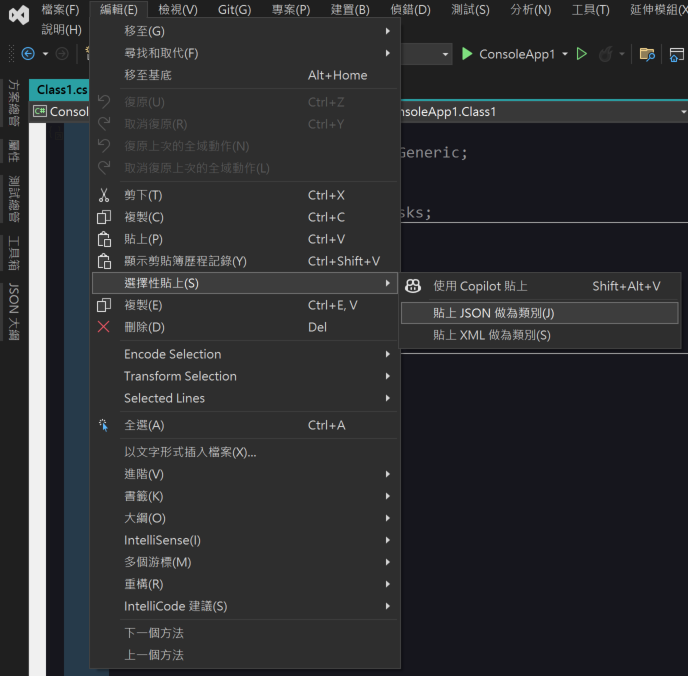
Generated Result
Visual Studio will automatically generate the corresponding class structure:
csharp
public class Rootobject {
    public User User { get; set; }
}

public class User {
    public string Id { get; set; }
    public string Name { get; set; }
    public Dept Dept { get; set; }
}

public class Dept {
    public string Id { get; set; }
    public string Name { get; set; }
}Notes
This feature is primarily intended for quickly generating basic class structures. If you are creating DTOs (Data Transfer Objects) for API integration, you should pay extra attention to the following:
- Type Checking: Verify that the automatically generated property types meet your actual requirements.
- Naming Conventions: When naming conventions differ between systems, you can use the
[JsonPropertyName]attribute to map to the correct field names. - Data Validation: Add appropriate validation logic based on your business requirements.
Change Log
- 2025-05-27 Initial version created.